Introduction
The IPMAT Admit Card 2029 is one of the most important documents required to appear for the Integrated Programme in Management Aptitude Test. Every registered candidate must complete the IPMAT admit card download process before the Examination date, as entry to the test centre is not permitted without a valid hall ticket.
The admit card for IPMAT 2029 is expected to be released a few weeks before the examination and will contain crucial information such as exam date, reporting time, test centre details, and candidate credentials. Whether you are appearing for IIM Indore or IIM Rohtak, downloading and verifying your IPMAT Hall Ticket 2029 should be your top priority before exam day.
What is IPMAT Admit Card 2029?
The IPMAT Admit Card 2029 is the official hall ticket issued to candidates who successfully complete the IPMAT registration process. It serves as proof of eligibility to appear for the entrance examination conducted for admission to Integrated Programme in Management (IPM) courses offered by institutes such as IIM Indore and IIM Rohtak.
The admit card for IPMAT 2029 contains essential information including the candidate’s name, application number, roll number, exam date, reporting time, and examination centre details. Candidates must complete the IPMAT admit card download process and carry a printed copy of the IPMAT Hall Ticket 2029 along with a valid photo ID on exam day.
Expected Release Date of IPMAT Admit Card 2029
The official release date for the IPMAT Admit Card 2029 has not been announced yet. However, based on previous admission cycles, candidates can expect the IPMAT Hall Ticket 2029 to be released in April 2029, approximately two to three weeks before the examination.
According to previous-year timelines, both IIM Indore and IIM Rohtak released admit cards in April before conducting exams in May.
Candidates should regularly check the official admission portals and registered email IDs for updates regarding the admit card for IPMAT 2029 and important exam notifications.
Expected IPMAT 2029 Timeline
| Event | Expected Date |
| IPMAT Registration Begins | February 2029 |
| Registration Closes | April 2029 |
| IPMAT Admit Card 2029 Release | April 2029 |
| IPMAT Examination | May 2029 |
| Result Declaration | June 2029 |
Downloading the IPMAT Admit Card 2029 as soon as it is released can help candidates avoid last-minute technical issues.
IPMAT Admit Card Download Process (Step-by-Step)
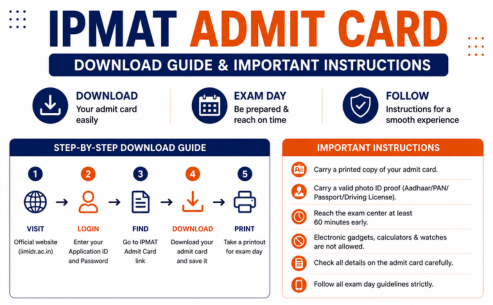
The IPMAT admit card download process is completely online and usually remains open until the examination date. Candidates should download the IPMAT Admit Card 2029 immediately after its release to avoid last-minute server issues or login problems.
Follow these steps to download the admit card for IPMAT 2029:
Step 1: Visit the Official Website
Go to the official admission portal of the institute you have applied to, such as IIM Indore or IIM Rohtak.
Step 2: Click on the Admit Card Link
Locate the “IPMAT Admit Card” or “Download Admit Card” link available on the homepage.
Step 3: Enter Login Credentials
Provide your:
- Application Number/User ID
- Password or Date of Birth
These credentials are required to access the IPMAT Hall Ticket 2029.
Step 4: Verify All Details
Once the IPMAT Admit Card 2029 appears on the screen, carefully review all information before downloading.
Step 5: Download and Print
Download the PDF version and take at least two clear printouts of the admit card for IPMAT 2029 for examination and future admission requirements.
| Required Login Credentials |
| Application Number/User ID |
| Password or Date of Birth |
Details Mentioned on IPMAT Hall Ticket 2029
After completing the IPMAT admit card download, candidates should carefully verify every detail mentioned on the IPMAT Hall Ticket 2029. Any discrepancy should be reported to the concerned admission authority immediately to avoid issues on exam day.
According to previous IPMAT admit cards, the following details are generally included:
| Details to Verify on IPMAT Admit Card 2029 |
| Candidate Name |
| Date of Birth |
| Category |
| Photograph |
| Signature |
| Application Number |
| Roll Number |
| Exam Date |
| Exam Timing |
| Exam Centre Address |
| Reporting Time |
| Exam Day Instructions |
Before exam day, ensure that all information on the admit card for IPMAT 2029 matches your registration details. A correctly verified IPMAT Admit Card 2029 helps prevent unnecessary complications at the examination centre.
Documents Required Along With Admit Card for IPMAT 2029
Carrying the IPMAT Admit Card 2029 alone is not sufficient for entry into the examination hall. Candidates must also carry a valid government-issued photo ID for identity verification. Examination authorities verify both documents before allowing candidates to appear for the test.
Accepted Photo ID Proofs
| Valid ID Documents |
| Aadhaar Card |
| PAN Card |
| Passport |
| Voter ID |
| Driving Licence |
Candidates should ensure that the name on the photo ID matches the details mentioned on the admit card for IPMAT 2029. It is also advisable to carry an extra passport-size photograph along with the IPMAT Hall Ticket 2029 as a precautionary measure.
How to Resolve IPMAT Admit Card 2029 Download Problems
Many candidates face minor issues while completing the IPMAT admit card download process. Fortunately, most of these problems can be resolved quickly with the right approach. Previous admission cycles have shown that login errors, incomplete registrations, and connectivity issues are among the most common concerns.
| Common Problem | Solution |
| Forgot Password | Use the password recovery option on the login portal |
| Incorrect Login Credentials | Recheck Application Number, User ID, and Password |
| Slow Internet Connection | Switch to a stable network and try again |
| Website Server Issues | Download during non-peak hours |
| Incomplete Registration | Verify that the application was successfully submitted |
| Admit Card Not Displaying | Clear browser cache or try a different browser |
Candidates should complete the IPMAT admit card download well before the examination date to avoid last-minute stress and technical difficulties.
Essential Exam Day Guidelines for IPMAT 2029 Aspirants
After downloading the IPMAT Admit Card 2029, candidates should carefully review all exam-day instructions mentioned on the hall ticket. Following these guidelines can help avoid unnecessary stress and ensure a smooth examination experience.
Important Instructions to Follow
| Instruction | Details |
| Reach Early | Arrive at least 60–90 minutes before reporting time |
| Carry Required Documents | Bring the IPMAT Admit Card 2029 and a valid photo ID |
| Avoid Prohibited Items | Do not carry mobile phones, smartwatches, calculators, or electronic gadgets |
| Follow Seating Rules | Sit only at the seat allotted by the invigilator |
| Maintain Discipline | Any unfair means may lead to disqualification |
Candidates should also verify the exam centre location a day before the examination. Proper planning, timely reporting, and carrying the admit card for IPMAT 2029 can help ensure a hassle-free exam day.
Why Downloading the IPMAT Admit Card 2029 Early Is Important
Many students postpone the IPMAT admit card download until the last moment, which can create unnecessary problems. Downloading the IPMAT Admit Card 2029 immediately after its release offers several advantages:
- Allows enough time to verify personal details.
- Helps identify errors in name, photograph, or exam centre information.
- Prevents issues caused by website traffic near the exam date.
- Provides time to contact authorities if corrections are required.
- Helps candidates plan travel arrangements for the examination centre.
The IPMAT Hall Ticket 2029 is not merely an entry pass; it is a crucial document required throughout the admission process. Candidates are advised to preserve multiple copies even after the examination.
Difference Between IPMAT Indore and IPMAT Rohtak Admit Card 2029
Although both institutes conduct separate entrance examinations, the overall purpose of the IPMAT Hall Ticket 2029 remains the same.
| Particulars | IPMAT Indore | IPMAT Rohtak |
| Issuing Authority | IIM Indore | IIM Rohtak |
| Admit Card Release | Expected April 2029 | Expected April 2029 |
| Login Credentials | Application Number & Password | Registration Credentials |
| Exam Date | Expected May 2029 | Expected May 2029 |
| Purpose | Entry to IPMAT Indore Exam | Entry to IPMAT Rohtak Exam |
Candidates applying to both institutes should separately download the admit card for IPMAT 2029 from each institute’s portal.
What to Do If There Is an Error on the IPMAT Admit Card 2029?
After downloading the IPMAT Admit Card 2029, candidates must immediately verify every detail.
Contact Authorities If You Notice:
- Incorrect name spelling
- Wrong category information
- Missing photograph
- Blurred signature
- Incorrect exam centre allocation
- Errors in date of birth
Do not wait until the examination date. Any discrepancy on the IPMAT Hall Ticket 2029 should be reported immediately through the official admission helpdesk.
How Tarkashastra Helps Students Prepare for IPMAT 2029
While downloading the IPMAT Admit Card 2029 is important, success in the examination depends on preparation quality. This is where Tarkashastra helps aspirants achieve their IPM admission goals.
Why Choose Tarkashastra for IPMAT Preparation?
- Comprehensive IPMAT classroom and online programs
- Section-wise preparation strategy for Quantitative Ability and Verbal Ability
- Regular mock tests based on the latest IPMAT pattern
- Personal mentorship from experienced faculty
- Performance analytics and doubt-solving sessions
- Previous-year question paper discussions
- Interview preparation guidance for IIM Indore and IIM Rohtak
Thousands of students rely on Tarkashastra’s structured preparation approach to improve scores and secure admission into prestigious IPM programs.
Students preparing for the examination should focus not only on the IPMAT admit card download process but also on developing a strong preparation strategy that maximizes their chances of selection.
For expert guidance, mock tests, and personalized mentoring, candidates can explore programs available at Tarkashastra.
Conclusion
The IPMAT Admit Card 2029 is one of the most important documents required for appearing in the entrance examination. Candidates should complete the IPMAT admit card download process immediately after release, carefully verify all details mentioned on the IPMAT Hall Ticket 2029, and carry the required documents on exam day. Proper planning, timely verification, and adherence to exam-day instructions can help ensure a smooth examination experience. Along with securing the admit card for IPMAT 2029, aspirants should focus on effective preparation through expert guidance, mock tests, and structured study plans to maximize their chances of admission into top IPM programs.
FAQ
1. When will the admit card be released?
The IPMAT Admit Card 2029 is expected to be released in April 2029, around 2–3 weeks before the exam.
2. How can I download it?
Visit the official website, log in using your application number and password/date of birth, and download the admit card.
3. What details are mentioned on the admit card?
The admit card includes the candidate’s name, roll number, application number, exam date, timing, reporting time, exam centre, photograph, and important instructions.
4. What documents should I carry with the admit card?
Carry a printed admit card along with a valid photo ID such as Aadhaar Card, PAN Card, Passport, Voter ID, or Driving Licence.
5. What should I do if there is an error on the admit card?
Immediately contact the admission authority or helpdesk to get the discrepancy corrected before the exam date.
6. Is a printed copy of the admit card mandatory?
Yes, candidates must carry a printed copy of the admit card to the examination centre. Digital copies are generally not accepted.
7. Can I change my exam centre after the admit card is issued?
No, exam centre changes are usually not allowed once the admit card has been released.
8. What are the important exam-day instructions?
Reach the centre early, carry the required documents, avoid electronic gadgets, and follow all invigilator instructions.
9. What if I forget my login credentials?
Use the “Forgot Password” or account recovery option available on the official admission portal.
10. Can I download the admit card multiple times?
Yes, candidates can usually download the admit card multiple times until the examination date by logging into the official portal.