Introduction
The IPMAT Indore admit card 2028 is one of the most important documents for candidates appearing for the Integrated Program in Management Aptitude Test conducted by IIM Indore. Without the admit card, candidates will not be allowed to enter the examination hall, regardless of their registration status.
Every year, thousands of students wait eagerly for the announcement of the IPMAT admit card date, as it marks the final stage before the examination. The admit card contains crucial information such as the candidate’s name, application number, exam date, reporting time, and exam centre details.
This comprehensive guide explains everything you need to know about the IPMAT Indore hall ticket, including release dates, download steps, required credentials, important instructions, and solutions to common admit card issues.
What is the IPMAT Indore Admit Card?
The IPMAT Indore Admit Card is an official document issued by IIM Indore to registered candidates before the examination.
It serves as:
- Proof of successful registration
- Entry pass to the examination centre
- Verification document for candidate identity
- Source of exam-related information
Candidates must download the admit card online from the official IPMAT portal once it becomes available.
Importance of the IPMAT Indore Hall Ticket
The IPMAT Indore hall ticket is not merely a formality.
It plays a critical role in the examination process.
Key Reasons Why It Is Important
- Mandatory for exam entry
- Contains exam centre details
- Provides reporting instructions
- Includes candidate identification information
- Helps avoid confusion on exam day
Without a valid admit card, candidates will be denied entry to the test centre.
Expected IPMAT Admit Card Date: 2028
Although IIM Indore has not officially announced the schedule for 2028, previous years provide a reliable indication.
Expected Timeline
| Event | Expected Date |
| Registration Begins | February 2028 |
| Registration Ends | March-April 2028 |
| Admit Card Release | May 2028 |
| IPMAT Exam Date | May-June 2028 |
Typically, the IPMAT Indore Admit Card is released 7–15 days before the examination.
Candidates should regularly monitor official notifications for updates regarding the IPMAT admit card date.
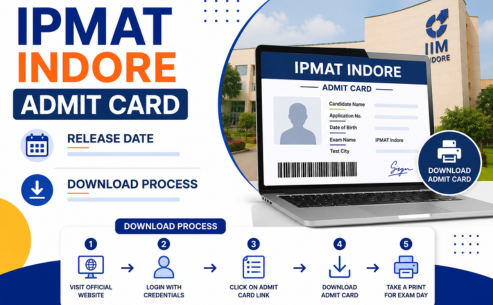
How to Download the IPMAT Indore Admit Card 2028
Downloading the admit card is a simple online process.
Step-by-Step Download Process
Step 1: Visit the Official Website
Go to the official IPMAT admission portal maintained by IIM Indore.
Step 2: Locate the Admit Card Link
Click on the “IPMAT 2028 Admit Card” or “Download Hall Ticket” link.
Step 3: Enter Login Credentials
Provide the required login details.
Step 4: Submit Information
Click on the login button.
Step 5: Access Admit Card
Your IPMAT Indore hall ticket will appear on the screen.
Step 6: Download PDF
Save the PDF file for future use.
Step 7: Print Multiple Copies
Take at least 2–3 printouts for safety.
Credentials Required to Download the Admit Card
Candidates must keep their registration details ready.
Common Login Credentials
| Credential | Required |
| Application Number | Yes |
| Registered Email ID | Sometimes |
| Date of Birth | Yes |
| Password | Sometimes |
The exact login requirements will be specified on the official portal.
Details Mentioned on the IPMAT Indore Admit Card
After downloading the admit card, candidates must verify all information carefully.
Personal Details
- Candidate Name
- Photograph
- Signature
- Date of Birth
- Category
- Gender
Examination Details
- Exam Date
- Reporting Time
- Exam Duration
- Test Centre Name
- Centre Address
Application Details
- Application Number
- Roll Number
- Registration ID
Instructions
- Exam-day guidelines
- Prohibited items
- Reporting requirements
Any discrepancy should be reported immediately.
Details to Verify on the Admit Card
Verification is extremely important.
Check the Following Carefully.
Name Spelling
Ensure it matches official records.
Photograph
Confirm the photo is visible and correct.
Signature
Verify that the uploaded signature appears properly.
Date of Birth
Cross-check with official documents.
Category Information
Ensure reservation category details are accurate.
Exam Centre Details
Confirm the assigned centre and reporting time.
Exam Date
Check the examination schedule carefully.
Mistakes should not be ignored.
What Should You Do If There Is an Error?
Errors occasionally occur during admit card generation.
Common Errors
- Incorrect name
- Wrong date of birth
- Missing photograph
- Blurred photograph
- Incorrect category
- Invalid centre information
Immediate Actions
- Contact the IPMAT helpdesk.
- Email the admission office.
- Provide application details.
- Attach supporting documents.
- Request correction immediately.
Delaying correction requests may create issues on exam day.
Is It Mandatory to Carry a Printed Copy?
Yes.
Candidates must carry a printed copy of the IPMAT Indore Admit Card.
Why Printed Copies Are Required
- Verification at the entry gate
- Attendance verification
- Candidate authentication
Digital copies on mobile phones are generally not accepted.
Recommendation
Carry:
- Two printed copies
- One backup copy in your bag
This minimises last-minute risks.
Documents Required at the Examination Centre
Apart from the IPMAT Indore hall ticket, candidates must carry valid identification.
Accepted Photo ID Proofs
| Document | Accepted |
| Aadhaar Card | Yes |
| PAN Card | Yes |
| Passport | Yes |
| Driving Licence | Yes |
| School ID (if permitted) | Sometimes |
| Voter ID | Yes |
Always carry the original ID document.
Photocopies are generally not accepted.
Items Allowed and Prohibited at the Exam Centre
Allowed Items
- Admit Card
- Valid Photo ID
- Transparent Water Bottle (if permitted)
- Required medical documents (if applicable)
Prohibited Items
- Mobile phones
- Smart watches
- Calculators
- Bluetooth devices
- Notes and study material
- Electronic gadgets
Candidates should carefully follow official instructions.
Can You Change Your Exam Centre?
This is a common concern among candidates.
General Policy
Once the admit card is issued, exam centre changes are usually not allowed.
The centre allocation process is based on:
- Candidate preferences
- Seat availability
- Administrative requirements
Therefore, students should select preferred centres carefully during registration.
What If You Lose Your Admit Card?
Losing the admit card before the examination is not a major issue.
Solution
Simply:
- Visit the official portal.
- Log in again.
- Download the admit card.
- Print a fresh copy.
Because the admit card remains available online during the download window, candidates can retrieve it multiple times.
How Many Times Can You Download the Admit Card?
Generally, there is no restriction on the number of downloads.
Candidates may download the IPMAT Indore Admit Card multiple times before the examination.
Best Practice
Save copies in:
- Laptop
- Mobile phone
- Cloud storage
- Email account
This ensures easy access if needed.
Common Admit Card Download Issues and Solutions
Website Not Opening
Reason:
- High traffic
Solution:
- Try during non-peak hours
Forgot Password
Solution:
- Use the “Forgot Password” option
Incorrect Login Details
Solution:
- Verify registration credentials carefully
PDF Not Downloading
Solution:
- Update browser
- Clear cache
- Use another browser
Blank Admit Card
Solution:
- Contact the helpdesk immediately.
Exam Day Instructions for Candidates
Candidates should follow all examination guidelines.
Before Leaving Home
- Check the admit card.
- Carry ID proof
- Verify reporting time
- Plan travel route
At the Exam Centre
- Reach early
- Follow security checks
- Cooperate with staff
- Follow seating instructions.
Late arrivals may not be allowed entry.
Important Tips After Downloading the Admit Card
Read All Instructions
Many students skip this step.
Exam rules may change every year.
Verify Centre Location
Visit the location virtually through maps.
Arrange Documents Early
Avoid last-minute panic.
Keep Multiple Copies
Store copies at different locations.
Monitor Official Announcements
Any exam-related updates will be communicated through official channels.
Common Mistakes Candidates Should Avoid
Ignoring Errors
Always report discrepancies immediately.
Waiting Until the Last Day
Download the admit card as soon as it is released.
Forgetting ID Proof
An admit card alone may not be sufficient.
Carrying Prohibited Items
Electronic devices can lead to disqualification.
Arriving Late
Reach the centre well before reporting time.
Why the Admit Card Is More Than Just an Entry Pass
The IPMAT Indore Admit Card serves multiple purposes:
- Candidate identification
- Centre allocation
- Attendance verification
- Examination management
- Security compliance
Therefore, candidates should treat it as one of the most important documents in the admission process.
Final Thoughts
The IPMAT Indore Admit Card 2028 is a mandatory document that every aspirant must download and verify carefully before the examination. Understanding the expected IPMAT admit card date, download process, login credentials, and exam-day requirements can help students avoid unnecessary stress and last-minute complications.
Candidates should download the IPMAT Indore hall ticket as soon as it becomes available, verify all details, carry the required documents, and follow official examination instructions. Proper preparation for administrative requirements is just as important as academic preparation, ensuring a smooth and hassle-free exam experience.
FAQs
1. When will the IPMAT Indore admit card be released?
The IPMAT Indore Admit Card 2028 is expected to be released in May 2028, approximately one to two weeks before the examination.
2. How can I download the admit card?
Candidates can download the admit card by logging into the official IPMAT portal using their registration credentials.
3. What credentials are required for login?
Typically, candidates need their application number, date of birth, registered email ID, or password to access the admit card.
4. What details should I verify on the admit card?
Verify your name, photograph, signature, date of birth, exam centre, reporting time, and application details.
5. What should I do if there is an error?
Contact the IPMAT helpdesk or admission office immediately and request corrections with supporting documents.
6. Is it mandatory to carry a printed copy?
Yes, candidates must carry a printed copy of the admit card to the examination centre.
7. What documents should be carried to the exam centre?
Candidates should carry the admit card along with a valid government-issued photo ID.
8. Can I change my exam centre?
Generally, exam centre changes are not permitted after admit card issuance.
9. What if I lose my admit card?
You can log into the official portal and download a fresh copy before the examination.
10. How many times can I download it?
Usually, there is no limit. Candidates can download the admit card multiple times during the availability period.