IPMAT Admit Card 2028
The Integrated Program in Management Aptitude Test (IPMAT) is the gateway to prestigious five-year Integrated Programme in Management (IPM) courses offered by leading Indian Institutes of Management (IIMs). Every registered candidate must download their IPMAT admit card before the examination date.
The admit card serves as an official authorization to appear for the examination and verifies a candidate’s identity at the exam center.
What Is the IPMAT Admit Card?
The admit card for IPMAT is an official document issued by the examination authority to eligible candidates who have successfully completed the application process.
The admit card includes:
- Candidate information
- Exam schedule
- Reporting time
- Examination center details
- Exam-day instructions
Candidates should carefully review all information immediately after downloading their admit card.
Importance of the IPMAT Hall Ticket
The IPMAT hall ticket is mandatory because it:
- Confirms successful registration
- Provides exam center allocation
- Serves as proof of candidature
- Contains important exam instructions
- Is required for identity verification
Candidates without a valid admit card may be denied entry to the examination center.
When Will the IPMAT Admit Card 2028 Be Released?
The official schedule for IPMAT 2028 will be announced by the conducting authority.
Based on previous admission cycles, candidates can generally expect:
| Event | Expected Timeline |
| Application Form Closure | March–April 2028 |
| Admit Card Release | April–May 2028 |
| IPMAT Examination | May–June 2028 |
Candidates should regularly check the official examination portal for updates regarding admit card availability.
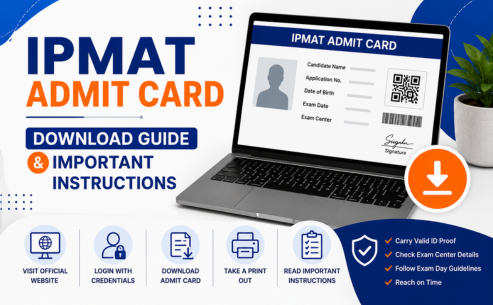
How to Download the IPMAT Admit Card 2028
Downloading the IPMAT admit card is a straightforward process.
Step 1: Visit the Official Website
Open the official IPMAT admission portal of the respective IIM conducting the examination.
Step 2: Click on the Admit Card Link.
Look for the “IPMAT Admit Card 2028” or “Download Hall Ticket” link.
Step 3: Login
Enter:
- Registered Email ID
- Application Number/User ID
- Password or Date of Birth
Step 4: Verify Details
After logging in, your admit card will appear on the screen.
Step 5: Download PDF
Download the admit card and save multiple copies on your device.
Step 6: Print Copies
Take at least two to three printouts for future use.
Details Mentioned on the IPMAT Admit Card
Candidates should verify all details carefully.
Typically, the admit card contains:
Candidate Details
- Full Name
- Photograph
- Signature
- Roll Number
- Application Number
- Category
Examination Details
- Exam Name
- Exam Date
- Exam Timing
- Reporting Time
- Examination Shift
Examination Center Details
- Centre Name
- Center Address
- Centre Code
Instructions
- Reporting guidelines
- Permitted items
- Prohibited items
- Exam conduct rules
Any discrepancy should be reported immediately.
How to Verify Information on the Admit Card
After downloading the admit card, check:
Personal Information
Ensure:
- Name spelling is correct
- Date of birth is accurate.
- Photograph is visible
- Signature is properly displayed
Examination Information
Verify:
- Date and time
- Reporting time
- Exam center details
Category Information
Check that reservation details, if applicable, are correctly reflected.
What Documents Should You Carry on Exam Day?
Along with the IPMAT hall ticket, candidates must carry a valid photo identity proof.
Accepted ID proofs generally include:
- Aadhaar Card
- PAN Card
- Passport
- Driving License
- Voter ID
- School/College ID (if permitted)
Additional Requirements
Candidates may also carry:
- Passport-size photographs (if instructed)
- Transparent water bottle (subject to guidelines)
Always review the latest exam-day instructions mentioned on the admit card.
Is a Printed Copy of the Admit Card Mandatory?
Yes.
Candidates are generally required to carry a printed copy of the IPMAT admit card to the examination center.
Digital copies stored on mobile phones or tablets are typically not accepted for entry.
To avoid inconvenience:
- Print multiple copies
- Use clear A4-size printouts
- Ensure the barcode and photograph are clearly visible.
What Should You Do If There Is an Error on Your Admit Card?
Errors occasionally occur due to technical or data-entry issues.
Common errors include:
- Incorrect name
- Wrong date of birth
- Missing photograph
- Incorrect category
- Centre allocation errors
Immediate Steps
Contact the helpdesk.
Reach out to the official support team through:
- Candidate helpline
- Admission office
Provide Supporting Documents
Keep ready:
- Application form copy
- Registration confirmation
- Government-issued ID
Request Correction
Report discrepancies immediately rather than waiting until exam day.
What If You Cannot Download the Admit Card?
Some candidates face technical issues while downloading their admit cards.
Common reasons include:
Incorrect Login Credentials
Double-check:
- Registered email address
- Password
- Application number
Slow Website Traffic
During peak periods:
- Try downloading during non-peak hours
- Use a stable internet connection.
Browser Issues
Try:
- Clearing browser cache
- Using another browser
- Switching devices
Server Problems
Wait for some time and try again later if the website is temporarily unavailable.
What If You Forget Your Login Credentials?
Forgetting login details is a common issue.
Most examination portals provide:
Forgot Password Option
Candidates can reset passwords using:
- Registered email address
- Mobile number
- Security verification process
Retrieve Application Number
The application number is often available through the following:
- Registration email
- SMS confirmation
- Candidate login portal
Always save registration details in multiple locations.
Can You Download the Admit Card Multiple Times?
Yes.
Candidates can generally download their IPMAT admit card multiple times until the examination date.
However:
- Download it as soon as it becomes available.
- Save PDF copies offline
- Keep printed copies ready
Avoid waiting until the last day.
Can you change your exam center after the admit card release?
In most cases, no.
Once the admit card is issued, examination centers are usually finalized.
Changes are typically allowed only under exceptional circumstances determined by the examination authority.
Candidates should therefore carefully select their preferred city while filling out the application form.
IPMAT Exam-Day Instructions
Following exam-day instructions is essential for a smooth examination experience.
Arrive Early
Reach the examination center at least:
- 60 to 90 minutes before reporting time
Late arrivals may not be allowed entry.
Carry Required Documents
Bring:
- Printed admit card
- Original photo ID proof
Without these documents, entry may be denied.
Follow Security Procedures
Candidates should cooperate with:
- Identity verification
- Biometric verification
- Security checks
Follow Seating Instructions
Sit only at the assigned workstation.
Do not change seats without permission.
Items Allowed Inside the Examination Center
Permitted items generally include:
- Admit card
- Photo ID proof
- Passport photographs (if required)
Candidates should verify the latest instructions issued by the examination authority.
Prohibited Items in the Examination Center
Candidates should not carry the following:
- Mobile phones
- Smart watches
- Bluetooth devices
- Calculators
- Notes or study materials
- Electronic gadgets
- Bags and wallets (if restricted)
Possession of prohibited items may result in disqualification.
Important Tips Before Downloading Your Admit Card
Keep Login Credentials Ready
Store:
- Registration number
- Password
- Email details
Use a Reliable Internet Connection
Avoid interruptions during download.
Download Early
Do not wait until the last moment.
Print Multiple Copies
Keep backup copies in case of loss or damage.
Common Mistakes to Avoid
Ignoring Admit Card Verification
Always verify every detail immediately.
Waiting Until the Last Day
Technical issues may prevent last-minute downloads.
Forgetting Identity Proof
The admit card alone may not be sufficient.
Carrying Restricted Items
Review prohibited-item guidelines carefully.
Final Thoughts
The admit card for IPMAT is one of the most critical documents in the admission process. Candidates should download their IPMAT admit card as soon as it becomes available, verify all details carefully, and follow all examination guidelines. Carrying the required documents, arriving on time, and understanding the exam-day instructions can help ensure a smooth examination experience. Proper preparation before exam day allows candidates to focus entirely on performing their best in the IPMAT 2028 examination.
FAQs
1. When will the IPMAT admit card be released?
The IPMAT admit card is usually released a few weeks before the examination. Candidates should regularly check the official website for updates.
2. How can I download my admit card?
You can download it by logging into the official portal using your application number, email ID, and password.
3. What details are mentioned on the admit card?
The admit card contains candidate details, exam date, reporting time, examination center information, and important instructions.
4. What documents should I carry on exam day?
You should carry a printed admit card and a valid government-issued photo ID.
5. What should I do if there is an error on my admit card?
Contact the official helpdesk immediately and provide supporting documents to request corrections.
6. Is a printed copy mandatory?
Yes, candidates are generally required to carry a printed copy of the admit card to the examination center.
7. Can I change my exam center after the admit card release?
Usually no. Exam center changes are rarely permitted after admit cards are issued.
8. What are the exam-day instructions?
Candidates should arrive early, carry required documents, follow security procedures, and avoid bringing prohibited items.
9. What if I forget my login credentials?
Use the “Forgot Password” option or retrieve your application details through your registered email or mobile number.
10. Can I download the admit card multiple times?
Yes, candidates can usually download their admit card multiple times until the examination date.